See also
You will need to understand how to use the terminal, what are environment variables and please read our compiling introduction.
Note
If you are a scientific user at a super computing facility we might have already prepared a software setup for you. See the following chapter if you can skip this step fully or in part by loading existing modules on those systems.
Dependencies
Section author: Axel Huebl, Klaus Steiniger, Sergei Bastrakov, Rene Widera
Overview
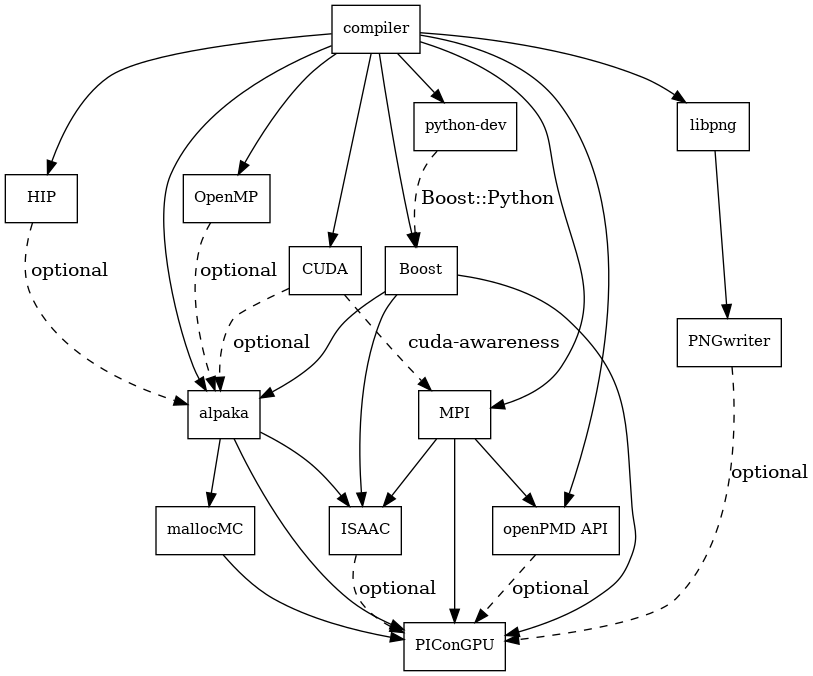
Fig. 1 Overview of inter-library dependencies for parallel execution of PIConGPU on a typical HPC system. Due to common binary incompatibilities between compilers, MPI and boost versions, we recommend to organize software with a version-aware package manager such as spack and to deploy a hierarchical module system such as lmod.
Requirements
Mandatory
Compiler
C++20 supporting compiler, e.g. GCC 10+ or Clang 11+
if you want to build for Nvidia GPUs, check the CUDA supported compilers page
note: be sure to build all libraries/dependencies with the same compiler version
note: CUDA 12.4 does not work with gcc 13, CUDA < 12.[0-3] does not work work withh gcc 12 or newer.
Debian/Ubuntu:
sudo apt-get install gcc-10 g++-10 build-essentialsudo update-alternatives --install /usr/bin/gcc gcc /usr/bin/gcc-10 60 --slave /usr/bin/g++ g++ /usr/bin/g++-10
Arch Linux:
sudo pacman --sync base-develif the installed version of gcc is too new, compile an older gcc
Spack:
spack install gcc@12.2.0make it the default in your packages.yaml or suffix all following
spack installcommands with a space and%gcc@12.2.0
CMake
3.28.0 or higher
Debian/Ubuntu:
sudo apt-get install cmake file cmake-curses-guiArch Linux:
sudo pacman --sync cmakeSpack:
spack install cmake
MPI 2.3+
OpenMPI 1.7+ / MVAPICH2 1.8+ or similar
for running on Nvidia GPUs, perform a GPU aware MPI install after installing CUDA
Debian/Ubuntu:
sudo apt-get install libopenmpi-devArch Linux:
sudo pacman --sync openmpiSpack:
GPU support:
spack install openmpi+cudaCPU only:
spack install openmpi
environment:
export MPI_ROOT=<MPI_INSTALL>as long as CUDA awareness (
openmpi+cuda) is missing:export OMPI_MCA_mpi_leave_pinned=0
Boost
1.74.0+ (
program_options,atomicand header-only libs)Debian/Ubuntu:
sudo apt-get install libboost-program-options-devArch Linux:
sudo pacman --sync boostSpack:
spack install boost +program_optionsfrom source:
mkdir -p ~/src ~/libcd ~/srccurl -Lo boost_1_74_0.tar.gz https://boostorg.jfrog.io/artifactory/main/release/1.74.0/source/boost_1_74_0.tar.gztar -xzf boost_1_74_0.tar.gzcd boost_1_74_0./bootstrap.sh --with-libraries=program_options --prefix=$HOME/lib/boost./b2 cxxflags="-std=c++20" -j4 && ./b2 install
environment: (assumes install from source in
$HOME/lib/boost)export CMAKE_PREFIX_PATH=$HOME/lib/boost:$CMAKE_PREFIX_PATH
git
not required for the code, but for our workflows
1.7.9.5 or higher
Debian/Ubuntu:
sudo apt-get install gitArch Linux:
sudo pacman --sync gitSpack:
spack install git
rsync
not required for the code, but for our workflows
Debian/Ubuntu:
sudo apt-get install rsyncArch Linux:
sudo pacman --sync rsyncSpack:
spack install rsync
alpaka 2.1.X
alpaka is included in the PIConGPU source code
mallocMC 2.6.0
only required for CUDA and HIP backends
mallocMC is included in the PIConGPU source code
PIConGPU Source Code
git clone https://github.com/ComputationalRadiationPhysics/picongpu.git $HOME/src/picongpuoptional: update the source code with
cd $HOME/src/picongpu && git fetch && git pulloptional: change to a different branch with
git branch(show) andgit checkout <BranchName>(switch)
environment:
export PICSRC=$HOME/src/picongpuexport PIC_EXAMPLES=$PICSRC/share/picongpu/examplesexport PATH=$PATH:$PICSRCexport PATH=$PATH:$PICSRC/binexport PATH=$PATH:$PICSRC/src/tools/bin
python: - install as in Python Utilities
Optional Libraries
CUDA
g++-10 or newer is required
required if you want to run on Nvidia GPUs
Debian/Ubuntu:
sudo apt-get install nvidia-cuda-toolkitArch Linux:
sudo pacman --sync cudaSpack:
spack install cudaat least one CUDA capable GPU
compute capability:
sm_60or higherfull list of CUDA GPUs and their compute capability
More is always better. Especially, if we are talking GPUs :-)
environment:
export CMAKE_PREFIX_PATH=<CUDA_INSTALL>:$CMAKE_PREFIX_PATH
ROCm/HIP
required if you want to run on AMD GPUs
Debian/Ubuntu: -
export ROCM_VER=5.5.0-apt install rocm-llvm${ROCM_VER} hip-runtime-amd${ROCM_VER} rocm-dev${ROCM_VER} rocm-utils${ROCM_VER} rocrand-dev${ROCM_VER} rocm-cmake${ROCM_VER} rocm-device-libs${ROCM_VER} rocm-core${ROCM_VER}- for ROCM 6.0+ additionallyapt install hiprand-dev${ROCM_VER}at least one HIP capable GPU
LLVM target:
gfx906or higherfull list of AMD GPUs and their LLVM target
environment:
export CMAKE_PREFIX_PATH=<ROCM_INSTALL>:$CMAKE_PREFIX_PATHexport PATH=<ROCM_INSTALL>/llvm/bin:$PATH
If you do not install the following libraries, you will not have the full amount of PIConGPU plugins. We recommend to install at least pngwriter and openPMD.
libpng
1.2.9+ (requires zlib)
Debian/Ubuntu dependencies:
sudo apt-get install libpng-devArch Linux dependencies:
sudo pacman --sync libpngSpack:
spack install libpngfrom source:
mkdir -p ~/src ~/libcd ~/srccurl -Lo libpng-1.6.34.tar.gz ftp://ftp-osl.osuosl.org/pub/libpng/src/libpng16/libpng-1.6.34.tar.gztar -xf libpng-1.6.34.tar.gzcd libpng-1.6.34CPPFLAGS=-I$HOME/lib/zlib/include LDFLAGS=-L$HOME/lib/zlib/lib(if needed)./configure --enable-static --enable-shared --prefix=$HOME/lib/libpngmakemake install
environment: (assumes install from source in
$HOME/lib/libpng)export PNG_ROOT=$HOME/lib/libpngexport CMAKE_PREFIX_PATH=$PNG_ROOT:$CMAKE_PREFIX_PATH
pngwriter
0.7.0+ (requires libpng, zlib, and optional freetype)
Spack:
spack install pngwriterfrom source:
mkdir -p ~/src ~/libgit clone -b 0.7.0 https://github.com/pngwriter/pngwriter.git ~/src/pngwriter/cd ~/src/pngwritermkdir build && cd buildcmake -DCMAKE_INSTALL_PREFIX=$HOME/lib/pngwriter ..make install
environment: (assumes install from source in
$HOME/lib/pngwriter)export CMAKE_PREFIX_PATH=$HOME/lib/pngwriter:$CMAKE_PREFIX_PATH
openPMD API
optional, but strongly recommended as most PIConGPU output requires it
0.15.0+
Spack:
spack install openpmd-apiFor usage in PIConGPU, the openPMD API must have been built either with support for ADIOS2 or HDF5 (or both). When building the openPMD API from source (described below), these dependencies must be built and installed first.
For ADIOS2, CMake build instructions can be found in the official documentation. Besides compression, the default configuration should generally be sufficient, the
CMAKE_INSTALL_PREFIXshould be set to a fitting location. Compression withc-bloscis described below.For HDF5, CMake build instructions can be found in the official documentation. The parameters
-DHDF5_BUILD_CPP_LIB=OFF -DHDF5_ENABLE_PARALLEL=ONare required, theCMAKE_INSTALL_PREFIXshould be set to a fitting location.
from source:
mkdir -p ~/src ~/libgit clone -b 0.15.0 https://github.com/openPMD/openPMD-api.git ~/src/openPMD-apicd ~/src/openPMD-apimkdir build && cd buildcmake .. -DopenPMD_USE_MPI=ON -DCMAKE_INSTALL_PREFIX=~/lib/openPMD-apiOptionally, specify the parameters-DopenPMD_USE_ADIOS2=ON -DopenPMD_USE_HDF5=ON. Otherwise, these parameters are set toONautomatically if CMake detects the dependencies on your system.make -j $(nproc) install
environment:* (assumes install from source in
$HOME/lib/openPMD-api)export CMAKE_PREFIX_PATH="$HOME/lib/openPMD-api:$CMAKE_PREFIX_PATH"
If PIConGPU is built with openPMD output enabled, the JSON library nlohmann_json will automatically be used, found in the
thirdParty/directory. By setting the CMake parameterPIC_nlohmann_json_PROVIDER=extern, CMake can be instructed to search for an installation of nlohmann_json externally. Refer to LICENSE.md for further information.
c-blosc for openPMD API with ADIOS2
not a direct dependency of PIConGPU, but an optional dependency for openPMD API with ADIOS2; installation is described here since it is lacking in documentation elsewhere
general purpose compressor, used in ADIOS2 for in situ data reduction
Debian/Ubuntu:
sudo apt-get install libblosc-devArch Linux:
sudo pacman --sync bloscSpack:
spack install c-bloscfrom source:
mkdir -p ~/src ~/libgit clone -b v1.21.1 https://github.com/Blosc/c-blosc.git ~/src/c-blosc/cd ~/src/c-bloscmkdir build && cd buildcmake -DCMAKE_INSTALL_PREFIX=$HOME/lib/c-blosc -DPREFER_EXTERNAL_ZLIB=ON ..make install
environment: (assumes install from source in
$HOME/lib/c-blosc)export BLOSC_ROOT=$HOME/lib/c-bloscexport CMAKE_PREFIX_PATH=$BLOSC_ROOT:$CMAKE_PREFIX_PATH
ISAAC
1.6.0+
requires boost (header only), IceT, Jansson, libjpeg (preferably libjpeg-turbo), libwebsockets (only for the ISAAC server, but not the plugin itself)
enables live in situ visualization, see more here Plugin description
Spack:
spack install isaacfrom source: build the in situ library and its dependencies as described in ISAAC’s INSTALL.md
environment: set environment variable
CMAKE_PREFIX_PATHfor each dependency and the ISAAC in situ library
FFTW3
required for Shadowgraphy plugin
from tarball:
mkdir -p ~/src ~/libcd ~/srcwget -O fftw-3.3.10.tar.gz http://fftw.org/fftw-3.3.10.tar.gztar -xf fftw-3.3.10.tar.gzcd fftw-3.3.10./configure --prefix="$FFTW_ROOT"makemake install
environment: (assumes install from source in
$HOME/lib/fftw-3.3.10)export FFTW3_ROOT=$HOME/lib/fftw-3.3.10export LD_LIBRARY_PATH=$FFTW3_ROOT/lib:$LD_LIBRARY_PATH