See also
You will need to understand how to use the terminal, what are environment variables and please read our compiling introduction.
Note
If you are a scientific user at a supercomputing facility we might have already prepared a software setup for you. See the following chapter if you can skip this step fully or in part by loading existing modules on those systems.
Dependencies
Section author: Axel Huebl
Overview
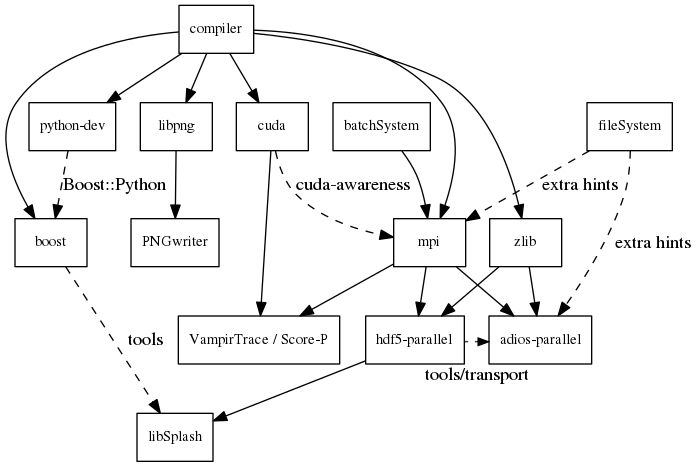
Overview of inter-library dependencies for parallel execution of PIConGPU on a typical HPC system. Due to common binary incompatibilities between compilers, MPI and boost versions, we recommend to organize software with a version-aware package manager such as spack and to deploy a hierarchical module system such as lmod. An Lmod example setup can be found here.
Requirements
Mandatory
gcc
4.9 - 7 (if you want to build for Nvidia GPUs, supported compilers depend on your current CUDA version)
CUDA 9.2 - 10.0: Use gcc 4.9 - 7
CUDA 10.1/10.2: Use gcc 4.9 - 8
note: be sure to build all libraries/dependencies with the same gcc version; GCC 5 or newer is recommended
Debian/Ubuntu:
sudo apt-get install gcc-5.3 g++-5.3 build-essentialsudo update-alternatives --install /usr/bin/gcc gcc /usr/bin/gcc-5.3 60 --slave /usr/bin/g++ g++ /usr/bin/g++-5.3
Arch Linux:
sudo pacman --sync base-develif the installed version of gcc is too new, compile an older gcc
Spack:
spack install gcc@5.3.0make it the default in your packages.yaml or suffix all following
spack installcommands with a space and%gcc@5.3.0
CMake
3.11.4 or higher
Debian/Ubuntu:
sudo apt-get install cmake file cmake-curses-guiArch Linux:
sudo pacman --sync cmakeSpack:
spack install cmake
MPI 2.3+
OpenMPI 1.7+ / MVAPICH2 1.8+ or similar
for running on Nvidia GPUs, perform a GPU aware MPI install after installing CUDA
Debian/Ubuntu:
sudo apt-get install libopenmpi-devArch Linux:
sudo pacman --sync openmpiSpack:
GPU support:
spack install openmpi+cudaCPU only:
spack install openmpi
environment:
export MPI_ROOT=<MPI_INSTALL>as long as CUDA awareness (
openmpi+cuda) is missing:export OMPI_MCA_mpi_leave_pinned=0
zlib
Debian/Ubuntu:
sudo apt-get install zlib1g-devArch Linux:
sudo pacman --sync zlibSpack:
spack install zlibfrom source:
./configure --prefix=$HOME/lib/zlibmake && make install
environent: (assumes install from source in
$HOME/lib/zlib)export ZLIB_ROOT=$HOME/lib/zlibexport LD_LIBRARY_PATH=$ZLIB_ROOT/lib:$LD_LIBRARY_PATHexport CMAKE_PREFIX_PATH=$ZLIB_ROOT:$CMAKE_PREFIX_PATH
boost
1.65.1 - 1.70.0 (
program_options,filesystem,system,math,serializationand header-only libs, optional:fiberwithcontext,thread,chrono,atomic,date_time)Debian/Ubuntu:
sudo apt-get install libboost-program-options-dev libboost-filesystem-dev libboost-system-dev libboost-thread-dev libboost-chrono-dev libboost-atomic-dev libboost-date-time-dev libboost-math-dev libboost-serialization-dev libboost-fiber-dev libboost-context-devArch Linux:
sudo pacman --sync boostSpack:
spack install boostfrom source:
curl -Lo boost_1_65_1.tar.gz https://dl.bintray.com/boostorg/release/1.65.1/source/boost_1_65_1.tar.gztar -xzf boost_1_65_1.tar.gzcd boost_1_65_1./bootstrap.sh --with-libraries=atomic,chrono,context,date_time,fiber,filesystem,math,program_options,serialization,system,thread --prefix=$HOME/lib/boost./b2 cxxflags="-std=c++11" -j4 && ./b2 install
environment: (assumes install from source in
$HOME/lib/boost)export BOOST_ROOT=$HOME/lib/boostexport LD_LIBRARY_PATH=$BOOST_ROOT/lib:$LD_LIBRARY_PATH
git
1.7.9.5 or higher
Debian/Ubuntu:
sudo apt-get install gitArch Linux:
sudo pacman --sync gitSpack:
spack install git
rsync
Debian/Ubuntu:
sudo apt-get install rsyncArch Linux:
sudo pacman --sync rsyncSpack:
spack install rsync
PIConGPU Source Code
git clone https://github.com/ComputationalRadiationPhysics/picongpu.git $HOME/src/picongpuoptional: update the source code with
cd $HOME/src/picongpu && git fetch && git pulloptional: change to a different branch with
git branch(show) andgit checkout <BranchName>(switch)
environment:
export PICSRC=$PICHOME/src/picongpuexport PIC_EXAMPLES=$PICSRC/share/picongpu/examplesexport PATH=$PICSRC:$PATHexport PATH=$PICSRC/bin:$PATHexport PATH=$PICSRC/src/tools/bin:$PATHexport PYTHONPATH=$PICSRC/lib/python:$PYTHONPATH
Optional Libraries
CUDA
required if you want to run on Nvidia GPUs
Debian/Ubuntu:
sudo apt-get install nvidia-cuda-toolkitArch Linux:
sudo pacman --sync cudaSpack:
spack install cudaat least one CUDA capable GPU
compute capability:
sm_30or higherfull list of CUDA GPUs and their compute capability
More is always better. Especially, if we are talking GPUs :-)
environment:
export CUDA_ROOT=<CUDA_INSTALL>
If you do not install the following libraries, you will not have the full amount of PIConGPU plugins. We recommend to install at least pngwriter and either libSplash (+ HDF5) or ADIOS.
libpng
1.2.9+ (requires zlib)
Debian/Ubuntu dependencies:
sudo apt-get install libpng-devArch Linux dependencies:
sudo pacman --sync libpngSpack:
spack install libpngfrom source:
mkdir -p ~/src ~/libcd ~/srccurl -Lo libpng-1.6.34.tar.gz ftp://ftp-osl.osuosl.org/pub/libpng/src/libpng16/libpng-1.6.34.tar.gztar -xf libpng-1.6.34.tar.gzcd libpng-1.6.34CPPFLAGS=-I$HOME/lib/zlib/include LDFLAGS=-L$HOME/lib/zlib/lib ./configure --enable-static --enable-shared --prefix=$HOME/lib/libpngmakemake install
environment: (assumes install from source in
$HOME/lib/libpng)export PNG_ROOT=$HOME/lib/libpngexport CMAKE_PREFIX_PATH=$PNG_ROOT:$CMAKE_PREFIX_PATHexport LD_LIBRARY_PATH=$PNG_ROOT/lib:$LD_LIBRARY_PATH
pngwriter
0.7.0+ (requires libpng, zlib, and optional freetype)
Spack:
spack install pngwriterfrom source:
mkdir -p ~/src ~/build ~/libgit clone https://github.com/pngwriter/pngwriter.git ~/src/pngwriter/cd ~/buildcmake -DCMAKE_INSTALL_PREFIX=$HOME/lib/pngwriter ~/src/pngwritermake install
environment: (assumes install from source in
$HOME/lib/pngwriter)export CMAKE_PREFIX_PATH=$HOME/lib/pngwriter:$CMAKE_PREFIX_PATHexport LD_LIBRARY_PATH=$HOME/lib/pngwriter/lib:$LD_LIBRARY_PATH
libSplash
1.7.0+ (requires HDF5, boost program-options)
Debian/Ubuntu dependencies:
sudo apt-get install libhdf5-openmpi-dev libboost-program-options-devArch Linux dependencies:
sudo pacman --sync hdf5-openmpi boostSpack:
spack install libsplash ^hdf5~fortranfrom source:
mkdir -p ~/src ~/build ~/libgit clone https://github.com/ComputationalRadiationPhysics/libSplash.git ~/src/splash/cd ~/build && rm -rf ../build/*cmake -DCMAKE_INSTALL_PREFIX=$HOME/lib/splash -DSplash_USE_MPI=ON -DSplash_USE_PARALLEL=ON ~/src/splashmake install
environment: (assumes install from source in
$HOME/lib/splash)export CMAKE_PREFIX_PATH=$HOME/lib/splash:$CMAKE_PREFIX_PATHexport LD_LIBRARY_PATH=$HOME/lib/splash/lib:$LD_LIBRARY_PATH
HDF5
1.8.13+
standard shared version (no C++, enable parallel)
Debian/Ubuntu:
sudo apt-get install libhdf5-openmpi-devArch Linux:
sudo pacman --sync hdf5-openmpiSpack:
spack install hdf5~fortranfrom source:
mkdir -p ~/src ~/libcd ~/srcdownload hdf5 source code from release list of the HDF5 group, for example:
curl -Lo hdf5-1.8.20.tar.gz https://support.hdfgroup.org/ftp/HDF5/releases/hdf5-1.8/hdf5-1.8.20/src/hdf5-1.8.20.tar.gztar -xzf hdf5-1.8.20.tar.gzcd hdf5-1.8.20./configure --enable-parallel --enable-shared --prefix $HOME/lib/hdf5/makeoptional:
make testmake installIf you encounter errors related to linking MPI during
./configure, you might try setting the compiler manually via./configure --enable-parallel --enable-shared --prefix $HOME/lib/hdf5/ CC=mpicc CXX=mpic++.
environment: (assumes install from source in
$HOME/lib/hdf5)export HDF5_ROOT=$HOME/lib/hdf5export LD_LIBRARY_PATH=$HDF5_ROOT/lib:$LD_LIBRARY_PATH
splash2txt
requires libSplash and boost
program_optionsconverts slices in dumped hdf5 files to plain txt matrices
assume you [downloaded](#requirements) PIConGPU to PICSRC=$HOME/src/picongpu
mkdir -p ~/build && cd ~/buildcmake -DCMAKE_INSTALL_PREFIX=$PICSRC/src/tools/bin $PICSRC/src/tools/splash2txtmakemake installenvironment:
export PATH=$PATH:$PICSRC/src/splash2txt/build
options:
splash2txt --helplist all available datasets:
splash2txt --list <FILE_PREFIX>
png2gas
requires libSplash, pngwriter and boost
program_options)converts png files to hdf5 files that can be used as an input for species initial density profiles
compile and install exactly as splash2txt above
c-blosc
general purpose compressor, used in ADIOS for in situ data reduction
Debian/Ubuntu:
sudo apt-get install libblosc-devArch Linux:
sudo pacman --sync bloscSpack:
spack install c-bloscfrom source:
mkdir -p ~/src ~/build ~/libcd ~/srccurl -Lo c-blosc-1.15.0.tar.gz https://github.com/Blosc/c-blosc/archive/v1.15.0.tar.gztar -xzf c-blosc-1.15.0.tar.gzcd ~/build && rm -rf ../build/*cmake -DCMAKE_INSTALL_PREFIX=$HOME/lib/c-blosc -DPREFER_EXTERNAL_ZLIB=ON ~/src/c-blosc-1.15.0/makemake install
environment: (assumes install from source in
$HOME/lib/c-blosc)export BLOSC_ROOT=$HOME/lib/c-bloscexport CMAKE_PREFIX_PATH=$BLOSC_ROOT:$CMAKE_PREFIX_PATHexport LD_LIBRARY_PATH=$BLOSC_ROOT/lib:$LD_LIBRARY_PATH
ADIOS
1.13.1+ (requires MPI, zlib and c-blosc)
Debian/Ubuntu:
sudo apt-get install libadios-dev libadios-binArch Linux using an AUR helper:
pacaur --sync libadiosArch Linux using the AUR manually:
sudo pacman --sync --needed base-develgit clone https://aur.archlinux.org/libadios.gitcd libadiosmakepkg -sri
Spack:
spack install adiosfrom source:
mkdir -p ~/src ~/libcd ~/srccurl -Lo adios-1.13.1.tar.gz http://users.nccs.gov/~pnorbert/adios-1.13.1.tar.gztar -xzf adios-1.13.1.tar.gzcd adios-1.13.1CFLAGS="-fPIC" ./configure --enable-static --enable-shared --prefix=$HOME/lib/adios --with-mpi=$MPI_ROOT --with-zlib=$HOME/lib/zlib --with-blosc=$HOME/lib/c-bloscmakemake install
environment: (assumes install from source in
$HOME/lib/adios)export ADIOS_ROOT=$HOME/lib/adiosexport LD_LIBRARY_PATH=$ADIOS_ROOT/lib:$LD_LIBRARY_PATH
ISAAC
1.4.0+
requires boost (header only), IceT, Jansson, libjpeg (preferably libjpeg-turbo), libwebsockets (only for the ISAAC server, but not the plugin itself)
enables live in situ visualization, see more here Plugin description
Spack:
spack install isaacfrom source: build the in situ library and its dependencies as described in ISAAC’s INSTALL.md
environment: set environment variable
CMAKE_PREFIX_PATHfor each dependency and the ISAAC in situ library
VampirTrace
for developers: performance tracing support
download 5.14.4 or higher, e.g. from www.tu-dresden.de
from source:
mkdir -p ~/src ~/build ~/libcd ~/srccurl -Lo VampirTrace-5.14.4.tar.gz "http://wwwpub.zih.tu-dresden.de/~mlieber/dcount/dcount.php?package=vampirtrace&get=VampirTrace-5.14.4.tar.gz"tar -xzf VampirTrace-5.14.4.tar.gzcd VampirTrace-5.14.4./configure --prefix=$HOME/lib/vampirtrace --with-cuda-dir=<CUDA_ROOT>make all -jmake install
environment: (assumes install from source in
$HOME/lib/vampirtrace)export VT_ROOT=$HOME/lib/vampirtraceexport PATH=$VT_ROOT/bin:$PATH